

Last updated: March 2026
Find answers to questions asked by Git Integration for Jira app users. Use the table of contents below to jump to a specific topic.
Contact our support team if you don’t see what you’re looking for.
On this page:
- General
- Developer
- Installation and setup
- Administration
- Repositories
- Workspace
- SSH
- Reindex
- Uninstall and reinstall
- Purchase and pricing
- Support
General
What is Git?
Git is a source code repository. Developers keep track of their source code using Git. Git relies heavily on branching and merging. Branching creates a temporary copy of source code for a single purpose like adding a feature or fixing a bug. Merging safely moves changes from one branch back to another.
What is this app?
Git Integration for Jira Cloud connects data from a Git server with your Jira Cloud instance. It displays code from Git in context with Jira issues.
Why would I want to see Git in my Jira?
Git can be complicated and daunting, especially for non-developers. Jira users use this app to work with Git in the familiar Jira interface.
How do Git and Jira work together?
In organizations with Git and Jira, it’s common to have a branch for each Jira issue and branches for every version.
When developers commit their work in Git with a Jira issue key in the message, the Git Integration for Jira app displays those changes in the Jira issue.
Is this safe?
Yes. The plugin is safe and well-tested. We test it on large Git repositories in large Jira instances. Over 5000 organizations in 70 countries use the Git Integration for Jira app.
Which version of Jira is compatible with Git for Jira Cloud app?
For compatibility details, see the Git Integration for Jira app Version History.
Developer
How do Git commits get associated with a Jira issue?
Include the exact issue key at the beginning of your commit message. The Git Integration for Jira Cloud app automatically indexes new commits and associates them with the referenced issue.
Example commit message:
PROJ-913 - Plugin version change from 2.6.7 to 2.6.8The issue key PROJ-913 links this commit to that Jira issue.
How do I ensure people follow our organization’s process for source code?
- Open the project summary in your browser.
- Click the Git Commits tab.
All changes that developers have submitted appear in reverse chronological order. Use this view to audit recent changes.
What happens to commit associations if a Jira issue moves to a new project?
Moving Jira issues to a different project is not recommended for repositories with extensive git commit histories. Associated git commits from the old project do not automatically transfer to the new project due to the different project key.
To manually associate git commits:
- Go to Apps ➜ Git Integration: Repository browser.
- Click a repository. The list defaults to the Compare view.
- Click the Commits tab.
- Click the edit
 icon or Link commit label.
 - Add, remove, or change Jira issue keys for the selected commit.
For migrations from Jira Server/Data Center to Jira Cloud, see Export project from Jira Server to Jira Cloud. Maintaining the same project name retains all git commit associations after migration.
Can the plugin scan multiple keys for one project?
Yes. The Git Integration for Jira Cloud app supports multiple Jira issue keys in a multiple-line commit message. See Smart Commits for more information.
Installation and Setup
Does it take long to install?
No. Install the app from inside your Jira Cloud instance using your browser via Atlassian Marketplace.
What do I need to install the app?
For most setups, you need:
- The URL to your Git server
- Credentials to access it
Ask your Git administrator for access to the Git repository with the same permissions as a regular developer.
What changes in Jira after installation?
The app adds:
- A new tab in each issue
- A new tab in each project
How do I install the plugin in a development version of Jira?
See the Atlassian documentation:
Look for the section titled “Can customers use developer licenses for my add-on?” for instructions.
Administration
Does the integration support many-to-many relationships between Jira projects and git repositories?
Yes. Repositories can support multiple projects. Developers create associations when they commit code with a specific issue key. Users with the “View Development Tools” permission for a project can see commits in that project.
Repositories
Does Git Integration for Jira support GitBlit with HTTPS (without SSH)?
Yes. The app supports GitBlit via HTTPS authentication. Use the Plain git integration wizard to connect. Enter your username and password when prompted.
Workspace
How do I see if work has started on an issue?
- Open an issue in your browser.
- Click the Git Commits tab.
If the tab says no Git log entries were found, work has not started on the ticket.

How do I see who has worked on an issue?
- Open an issue and click the Git Commits tab.
- Everyone listed in the “Author/Committer” column has worked on the issue.
How do I see when someone last worked on an issue?
- Open an issue and click the Git Commits tab.
- Changes appear from newest to oldest. The date/time on the first line shows the last submission.
How do I see what changed in a ticket?
- Open an issue and click the Git Commits tab.
- Commit messages show under the committer’s name.
- Click file links to view the actual source code changes.
SSH
Does this app support SSH authentication?
Yes. SSH keys with and without passphrases are supported.
Why do I need to provide a PRIVATE KEY instead of a PUBLIC KEY?
The SSH client (Jira Cloud) needs the PRIVATE KEY to connect to the Git server via SSH.
How do I configure an SSH remote git repository?
Use the Plain git integration wizard to configure SSH integration with remote git repositories.
Reindex
What does reindex do?
Reindex performs two operations:
- Updates the cloned repo from remote
- Updates the indexes containing info about every commit
How do I control reindexing?
Configure webhooks to trigger indexing based on events. See Configure Webhooks.
Set a high interval and configure webhook triggers for more control.
Why don’t commits appear immediately?
Commits won’t appear immediately. Configure webhooks via the Manage integrations page to make commits show faster.
Can I track specific branches when reindexing?
No. The Git Integration for Jira app performs a full index.
For more information, see Indexing Explainer for Git Integration for Jira Cloud.
Purchase and Pricing
How do I buy this add-on?
Buy the Git Integration for Jira app on Atlassian Marketplace using your Atlassian account.
What payment methods are accepted?
Atlassian Marketplace accepts MasterCard, Visa, American Express, bank transfer, and mailed check.
How do I determine pricing after the trial?
Use any of these methods:
-
In Jira: Install the app and go to
https://[your-jira].atlassian.net/admin/billing/estimate -
Atlassian Marketplace: See Git Integration for Jira pricing
-
Pricing Calculator: Use the Atlassian Cloud Pricing Calculator
-
Create a quote: Visit Atlassian.com
Support
Does the Git for Jira Cloud app support CJK languages or Unicode?
Yes. Unicode characters are supported and displayed properly.
Where can I find my App Information?
- Click Apps ➜ Git Integration for Jira.
- Click Settings.
- Copy the information at the bottom of the page, starting from “Current Build”.
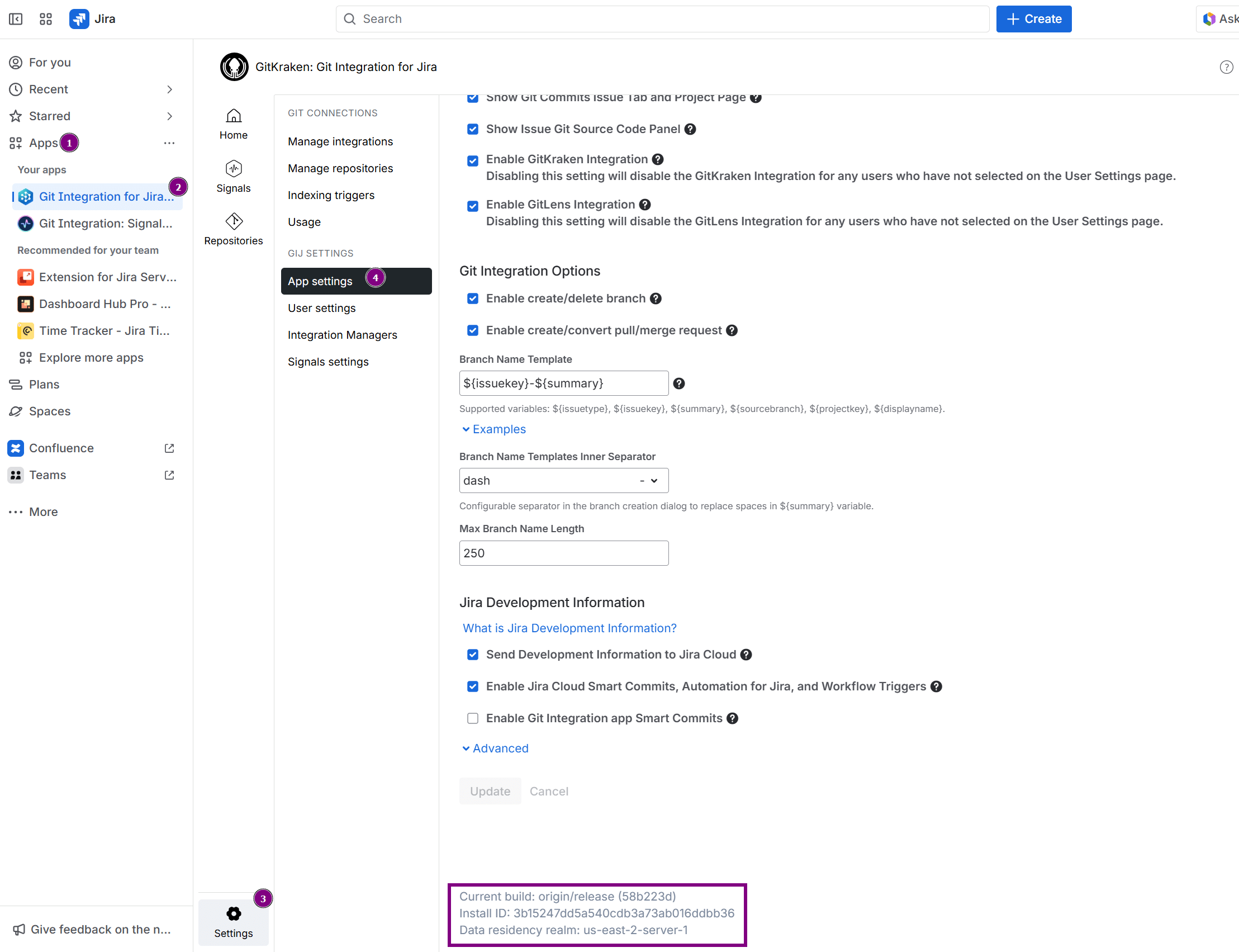
Include this information in support requests.
